



.svg)



.svg)


.svg)


Your HubSpot portal has probably evolved significantly since it was first set up. Settings have accumulated, workflows have multiplied, and data quality has drifted in ways nobody fully tracks.
A HubSpot portal audit is the systematic process of diagnosing what’s working, what’s broken, and what’s costing you money across your entire HubSpot account. A HubSpot audit is an in-depth assessment of how a HubSpot portal is performing. The objective is identifying areas for process optimization.
This guide walks you through the key components of a HubSpot audit, such as settings, processes, and data, to ensure comprehensive coverage. We’ll cover data, automation, reporting, and governance, so you can turn your CRM from a source of confusion into a competitive advantage.
What Is a HubSpot Portal Audit (and When You Need One)
A HubSpot audit is a structured review of settings, data integrity, automation logic, reporting frameworks, and integrations across all HubSpot hubs, Marketing Hub, Sales Hub, Service Hub, Operations, and Commerce. Think of it as a health check for your entire customer relationship management system.
This article is written specifically for HubSpot admins, RevOps professionals, and marketing and sales leaders who are managing active portals in 2026. Whether you’re overseeing 5,000 contacts or 500,000, the principles apply, only the timeline changes.
When should you run a comprehensive audit?
- Data accuracy has deteriorated, with duplicate rates exceeding 15%
- User adoption has dropped below 60% of sales reps updating deal stages weekly
- Reports require manual Excel reconciliation before leadership trusts them
- You’re preparing for a major 2026 campaign launch or website redesign
- Attribution data no longer tells a coherent story
What outcomes can you expect?
A thorough audit typically yields 15-30% improvements in CRM efficiency. Teams report cleaner data, faster reporting (hours reduced to minutes), reduced marketing contact overages, and better forecasting accuracy. For mid-sized enterprises paying $20,000+ annually for HubSpot licenses, maximizing that HubSpot investment becomes essential.
Consider this scenario: a portal created in 2020 that has grown organically without oversight. By 2026, it likely contains 30-50% inactive workflows, fragmented deal pipelines, and lifecycle stage definitions that nobody remembers setting. One company discovered their sales forecasts were skewed by 20-25% because enrollment errors had corrupted their pipeline data for years.
How to Run a HubSpot Portal Audit: The High-Level Approach
The most effective approach breaks your audit into logical categories: data management, CRM objects and associations, automation and workflows, reporting and dashboards, integrations and tech stack, and governance and security. These represent the key components of a HubSpot audit. This segmentation enables prioritized remediation rather than overwhelming your team.
Timeline expectations:
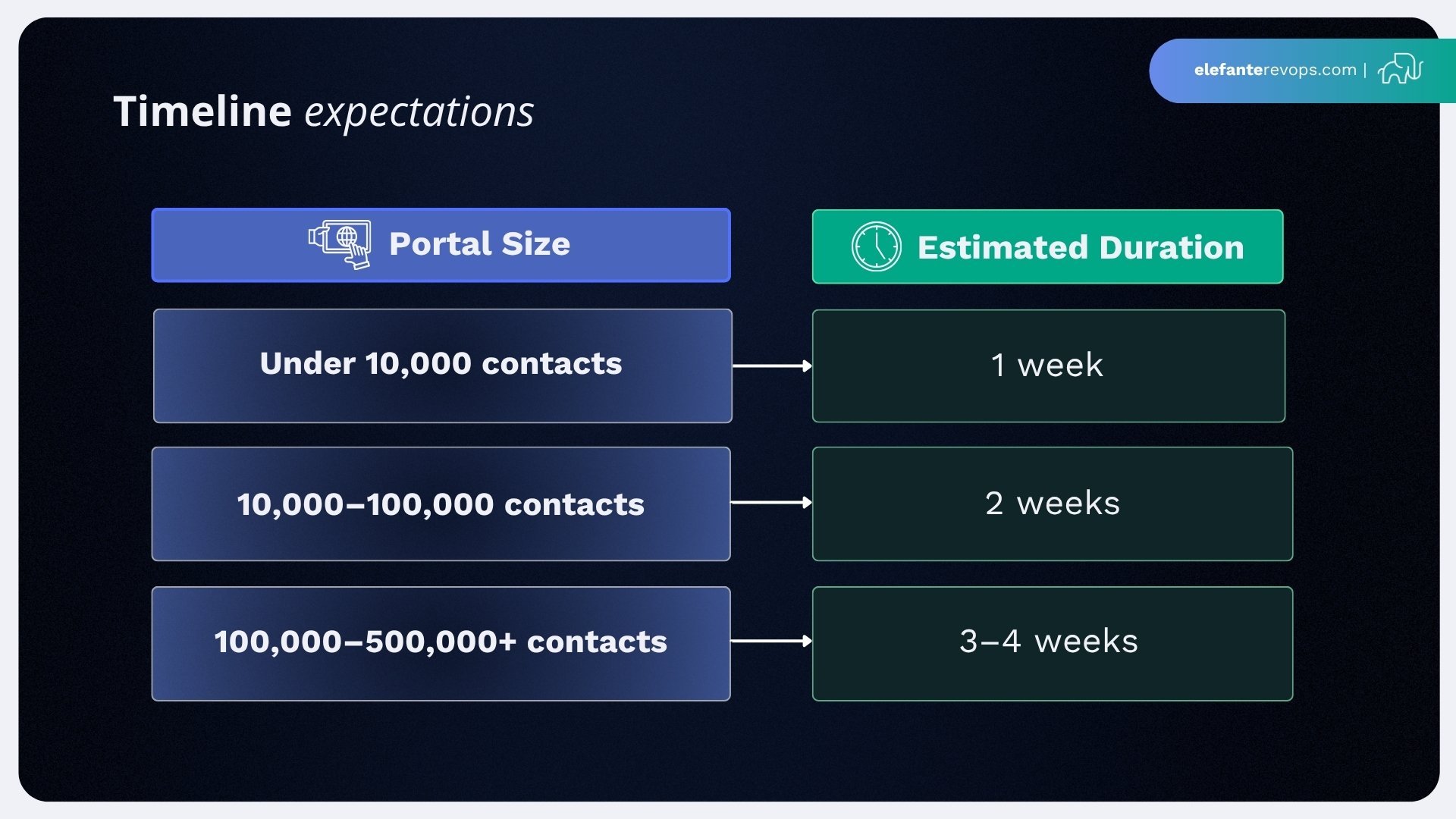
For each checklist item, assign a rating, red/amber/green or a 1-5 scale, to prioritize fixes. This prevents the audit from becoming an endless project.
Capture all findings in a central document or dashboard with clear owners and due dates. A shared Google Sheet or Notion page works well, though some teams use HubSpot custom objects to track remediation tasks. The HubSpot audit process typically includes a meticulous review of your HubSpot settings, processes, and data.
The remaining sections walk through 40-60 specific areas and questions, organized by category. Treat this as your comprehensive HubSpot audit checklist. An effective HubSpot audit involves evaluating data quality, cleaning unused assets, testing automation, and reviewing security.
Understanding HubSpot Portal Structure
A well-structured HubSpot portal is the backbone of effective marketing and sales operations. Each portal is made up of multiple hubs, such as Marketing Hub, Sales Hub, and Service Hub, each designed to support specific business functions. Understanding how these hubs interact and how your portal is organized is essential for maintaining data accuracy and streamlining processes.
A comprehensive HubSpot audit begins with a review of your portal’s overall setup, including how teams are organized, how workflows are structured, and the quality of your data. When your portal is logically arranged, it’s easier for users to navigate, manage information, and make informed decisions. This structure also supports better sales effectiveness and more impactful marketing efforts, as teams can quickly access the right data and tools.
Regular HubSpot audits are key to maintaining this structure. By routinely evaluating your portal, you can identify areas where data quality may be slipping, workflows are becoming outdated, or navigation is becoming cumbersome. This proactive approach ensures your Marketing Hub, Sales Hub, and Service Hub continue to support your business goals, keeping your portal up to date and your operations running smoothly.
Gathering Information and Data for Your Audit
The foundation of any successful HubSpot audit is thorough data collection. Start by gathering all relevant information from your portal, including contact records, company records, deal properties, and any custom properties you’ve created over time. Pay special attention to identifying duplicate records and assessing overall data hygiene, clean, accurate data is essential for reliable reporting and effective marketing campaigns.
As you review your data, look for inconsistencies or gaps that could impact your customer relationship management and sales processes. Evaluate the completeness of your contact records and deal properties, and ensure that all custom properties are still relevant to your current business needs. This step is also the time to analyze the performance of your marketing campaigns and sales efforts, using the data to uncover actionable insights.
By systematically gathering and analyzing this information, you’ll be able to pinpoint areas where your HubSpot investment can be optimized. This process not only streamlines your workflows but also enhances the effectiveness of your marketing and sales operations, setting the stage for a more impactful and comprehensive HubSpot audit.
Core CRM Data: Contacts, Companies & Associations
Data hygiene is the foundation of every 2026 portal audit. Compromised data cascades into every HubSpot function, from email deliverability to revenue attribution to sales effectiveness.
HubSpot’s Data Quality Command Center (released in 2023) provides visualizations of data completeness scores, duplicate clusters, and property usage heatmaps. Start there for a quick overview.
Contact and company review checklist:
- Tally total contacts and companies against your plan limits
- Identify obvious duplicate contacts using HubSpot’s built-in duplicate management
- Review bounced contacts and unsubscribed records for bulk deletion (often >10% in legacy portals)
- Segment marketing contacts versus non-marketing contacts to avoid unnecessary subscription costs
- Audit custom properties on contacts and companies, remove unused ones, standardize naming conventions
- Check contact properties and deal properties for redundant fields (150+ custom properties per object is common bloat)
- Verify associations: contacts ↔ companies ↔ deals ↔ tickets
A common issue discovered in audits: 25% of deals exist as “orphans” without proper contact or company associations, completely skewing account-based metrics and making contact segmentation unreliable.
Audits frequently reveal 70% of portals have 20-30% of contact records lacking emails or assigned owners, directly inflating costs under HubSpot’s tiered pricing.
Key Data Quality Metrics to Check
This checklist can be completed in under one hour using HubSpot lists and custom reports:
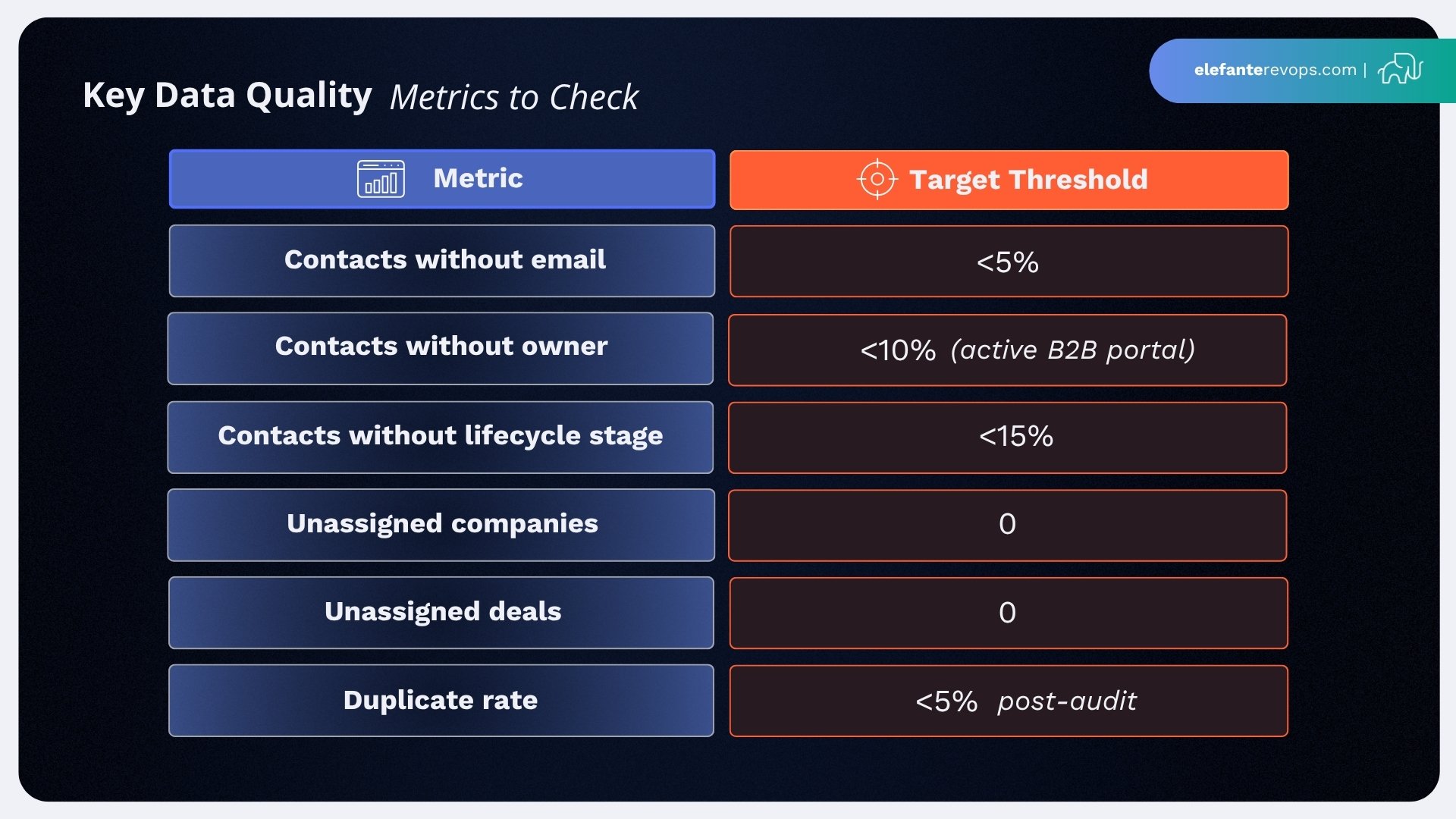
Use active lists to calculate these percentages, then save them for ongoing monitoring. The right data in your CRM means your marketing and sales operations can actually trust what they see.
After running these checks, document your baseline. Top-quartile portals maintain 90%+ completeness. If you’re starting at 70%, you have clear room for improvement, and accurate data becomes your benchmark for measuring success.
Deals, Pipelines & Revenue Process
For most B2B HubSpot deployments in 2026, the deals area is central to revenue operations. Yet this is where portals accumulate the most technical debt.
Pipeline inventory:
- How many pipelines exist? (Most portals have 3-7)
- Which are actively used versus legacy or test pipelines?
- Are there annual pipelines that were never closed out?
Audits reveal that roughly 50% of pipelines in mature portals have been unused since 2024. These clutter reporting and confuse new team members.
Deal stages review:
- Are stage names clear and mapped to a consistent sales process?
- Are probabilities assigned (e.g., 30%/60%/85%) for forecasting accuracy?
- Do exit criteria automate transitions where appropriate?
- Are 90%+ of deals linked to both companies and primary contacts?
Common red flags include deals stuck in a stage for 90+ days, deal tracking that requires manual spreadsheets outside HubSpot, and deal stages that don’t align with how your sales team actually sells.
Audit Questions for Sales Leaders
Use these questions to assess whether your HubSpot crm supports or hinders your sales efforts:
- Can you generate a reliable forecast in under 10 minutes from HubSpot alone?
- Do sales reps regularly update close dates, amounts, and deal stages inside HubSpot?
- Is there a clear owner for maintaining pipeline definitions (reviewed at least every June and December)?
- What percentage of deals have associated contacts and companies? (Target: 95%+)
- Are reps using external spreadsheets for deal tracking or forecasting?
- Does the mobile experience slow down reps in the field?
- How many deals have been stuck in the same stage for 90+ days?
- When was the last time pipeline definitions were reviewed with frontline sellers?
Interview 2-3 frontline salespeople during your audit. They’ll identify friction points that leadership doesn’t see, slow mobile editing, confusing stage definitions, or fields that seem irrelevant to their workflow.
Marketing Engine: Lists, Forms, Emails & Landing Pages
This section focuses on Marketing Hub components that most often create clutter. Marketing teams build assets for campaigns, but rarely archive them afterward.
Lists audit:
- Total number of lists (500+ is common, but < 20% are typically active)
- Ratio of static versus active lists
- Presence of naming conventions and folder organization to facilitate easy access and efficient management
- Archive lists created before 2022 with zero enrollments
Forms audit:
- How many forms exist? (Ideal: < 50 active)
- Which forms are embedded on high-traffic pages?
- Do forms consistently set lifecycle stages and contact owner?
- Flag forms that haven’t captured submissions in 12+ months
Email performance (last 6-12 months):
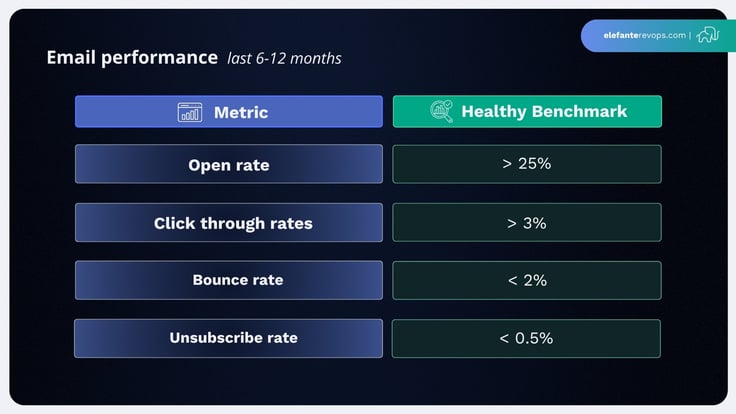
Note: Apple Mail Privacy Protection (since 2021) inflates open rates by 10-15%. Focus on clicks and bounces for more accurate data.
Landing pages audit:
- Identify top-converting pages and ensure they’re optimized
- Archive low-engagement pages (< 1% conversion) created before 2022
- Confirm all pages are assigned to campaigns for proper attribution
- Check that lead capture forms are functioning correctly
Removing unused files and outdated assets improves portal performance and makes lead generation reporting more accurate.
Lifecycle Stages, Lead Scoring & Subscription Types
This subsection connects data collection and marketing operations, specifically, how leads move from subscriber to opportunity to customer.
Lifecycle stage review:
- Document the definition of each stage in 2026
- Confirm both sales and marketing teams agree on definitions
- Check that automation correctly progresses contacts through stages
A common issue: 40% of leads stagnate in “Subscriber” without progression triggers, traceable to form misconfigurations from years ago. When lifecycle definitions are misaligned, funnel reports distort by 20-40%.
Lead scoring audit:
- Review scoring rules for outdated behaviors (e.g., downloads of 2020 ebook offers)
- Check that high-value actions (demo requests, pricing page visits) are weighted appropriately
- Confirm negative scoring removes disqualified leads from marketing efforts
Subscription types and consent:
- Audit subscription types for GDPR, CCPA, and UK GDPR compliance
- Verify consent status is properly tracked for EU/UK audiences
- Review data privacy settings for any compliance gaps
For portals with EU or UK contacts, non-compliance risks fines up to 4% of revenue. HubSpot’s 2026 updates include automated consent reports that streamline this process.
Automation & Workflows: Cleaning Up the “Black Box”
Workflows accumulate over years and become a major source of bugs and confusion. Portals typically contain 100-500+ workflows, with 40-60% inactive.
Step-by-step cleanup process:
- Export a list of all workflows from your portal
- Sort by status (active vs. inactive), last edited date, and total enrollments
- Archive or delete workflows inactive since before 2024 that aren’t tied to current marketing campaigns
- Check for overlapping workflows modifying the same property (lifecycle stage, owner, lead status)
- Add descriptions and notes to remaining key workflows
- Document the purpose of each critical workflow for future admins
Overlapping workflows on properties like lifecycle stage can create loops or conflicting updates. One company discovered duplicate workflows were double-scoring leads, causing 10-15% conversion drops before the issue was identified.
Red flags to watch for:
- Workflows with broken triggers or enrollment criteria
- Unused workflows still in “active” status
- Automation processes with no clear owner or documentation
- Optimizing workflows that reference deleted properties or lists
Testing, Monitoring & Governance for Workflows
Establish a standard testing process for any new or updated workflow:
- Create a “sandbox list” of 10-20 internal test contacts and companies
- Test all enrollment triggers and actions before going live
- Use HubSpot’s workflow revision history to track changes
- Review enrollment logs to verify expected behavior
Governance recommendations:
- Implement quarterly workflow review meetings with marketing teams, sales operations, and RevOps
- Document ownership: who can create, edit, and approve automation changes
- Require sandbox testing before any workflow touches production data
- Maintain a changelog for significant workflow modifications
For HubSpot teams managing complex automation, governance prevents the accumulation of technical debt that triggers future audits.
Dashboards, Reports & Analytics
Reporting inconsistencies are often why leadership initiates a HubSpot portal audit in the first place. If your sales team doesn’t trust the numbers, something is broken.
Dashboard inventory:
- How many dashboards exist? (50+ is common, with 70% unused)
- Who owns each dashboard?
- Which dashboards are actually referenced in meetings?
Consolidation approach:
- Identify duplicate custom reports with slight filter variations
- Consolidate into 5-10 “official” dashboards: executive, sales, marketing, customer success
- Delete or archive dashboards not accessed in 6+ months
Each dashboard should tie to clear business questions:
- What is our average sales cycle length in 2025-2026 versus 2023-2024?
- Which channels drive the highest-quality leads?
- Where are deals stalling in the pipeline?
Essential cross-object report: Most portals should have a report combining contacts + deals + activities to show the full journey from first touch to closed won. This provides actionable insights for both marketing and sales efforts.
Attribution & Campaign Reporting
HubSpot Campaigns group emails, landing pages, forms, and ads under specific initiatives. Proper campaign structure enables accurate attribution.
Campaign audit checklist:
- Review naming conventions, align with calendar timeframes (e.g., “2026-Q2_Product-Launch_US”)
- Ensure all relevant assets are assigned to their campaigns
- Check that campaigns cover your major marketing efforts for the period
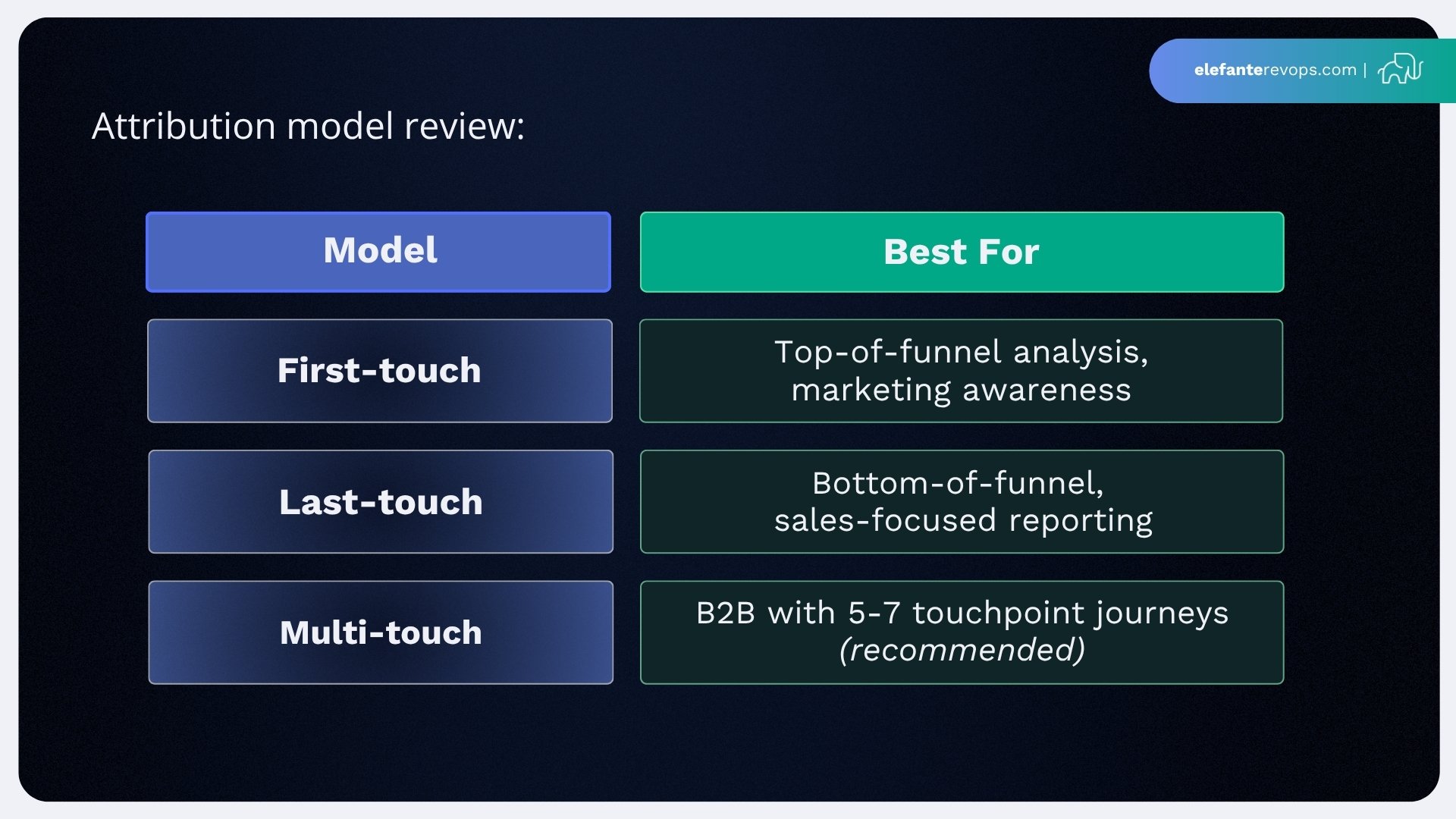
Attribution model review:
Integration checks:
- Confirm Google Ads, LinkedIn Ads, and google search console are properly connected
- Verify UTM parameters are consistent across channels
- Check that other tools feeding data into HubSpot maintain data integrity
Campaign cleanup and standardization can typically be completed in under a week, with 30% improvements in attribution accuracy.
Integrations, Tech Stack & Data Security
This is a critical but often overlooked part of any serious portal audit. Integrations break silently, creating data gaps that compound over time.
Native integration review:
- List all connections from HubSpot’s “Connected Apps” area
- Check sync health and error logs for each integration
- Identify disconnected apps or fields that have stopped syncing
- Verify bidirectional mappings are functioning correctly
Salesforce syncs, for example, falter 20% of the time without active monitoring. Regular checks prevent data silos between systems.
Non-native integration audit:
- Review custom APIs and iPaaS platforms (Zapier, Make, or legacy middleware)
- Determine if each integration is still needed in 2026
- Consider replacing complex workarounds with native HubSpot features using portal iq or similar tools
- Check usage against plan limits (Zapier free tier caps at 100 tasks/month)
Data security checklist:
- Confirm two-factor authentication (2FA) is mandatory for all users
- Review SSO usage and configuration
- Audit user access levels and IP restrictions
- Check data privacy settings for GDPR, LGPD, and CCPA compliance
- Verify how data is collected, stored, and synced with third parties
Certified HubSpot partners can assist with complex integration audits, particularly for enterprises with custom middleware.
User Management, Permissions & Audit Trail
This subsection focuses on who has access and what they can change inside the portal.
User review:
- List all users with portal access
- Remove access for ex-employees (15% of portals retain former employee accounts)
- Eliminate generic shared logins that prevent accountability
- Review how many contacts each user owns and whether assignments are current
Permission best practices:
- Use role-based profiles (e.g., “Sales Rep UK,” “Marketing Manager EU”) rather than ad hoc settings
- Restrict Super Admin access to <10% of users
- Document which roles can create, edit, or delete key assets
Audit trail review:
- Access HubSpot’s audit logs under security settings
- Look for suspicious changes or unexpected access patterns
- Flag any modifications to critical workflows or integrations
Implement a recurring user-access review at least twice per year (April and October) as part of ongoing governance. This prevents security gaps and ensures your HubSpot account stays up to date.
Understanding HubSpot Teams
HubSpot teams are central to the smooth operation of your portal, enabling effective collaboration across marketing, sales, and customer success functions. During a comprehensive HubSpot audit, it’s important to review how your teams are structured, including user roles and permissions. This ensures that every member of your marketing teams, sales teams, and customer success teams has the right level of access to perform their tasks efficiently.
Optimizing your HubSpot teams involves more than just assigning users to groups, it’s about aligning team structures with your company’s goals and ensuring seamless communication. By regularly auditing team settings and permissions, you can prevent access issues, reduce bottlenecks, and support better customer relationship management. This alignment ultimately drives improvements in sales operations and marketing efforts, helping your business get the most out of your HubSpot portal.
Using Portal IQ for Audit and Optimization
Portal IQ is an invaluable tool for businesses looking to audit and optimize their HubSpot portal. With its comprehensive analysis capabilities, Portal IQ evaluates your portal’s structure, data quality, and workflow efficiency, providing a clear picture of where improvements can be made. By leveraging Portal IQ, you can quickly identify issues affecting data accuracy, contact segmentation, and overall marketing and sales operations.
The tool generates a detailed report with actionable recommendations, helping you enhance sales effectiveness, marketing efforts, and customer relationship management. Portal IQ also offers insights into optimizing landing pages, improving email performance, and refining automation processes for better efficiency. By integrating Portal IQ into your regular audit routine, you can ensure your HubSpot investment delivers maximum value and your portal remains a powerful asset for your business.
Working with a HubSpot Partner
Partnering with a certified HubSpot partner can significantly enhance the results of your HubSpot portal audit and ongoing optimization efforts. HubSpot partners bring deep expertise in marketing campaigns, sales operations, and customer relationship management, guiding you through every step of a comprehensive HubSpot audit. They help identify areas for improvement, implement best practices, and develop strategies to maximize your HubSpot investment.
A HubSpot partner can also provide tailored training and ongoing support, ensuring your team is equipped to maintain better efficiency in your marketing and sales operations. With their guidance, you can streamline your portal, improve sales efforts, and achieve more impactful marketing and sales outcomes. By leveraging the experience of a HubSpot partner, your business can unlock the full potential of your portal and drive sustained growth.
Turning Audit Findings into an Action Plan
An audit is only valuable if it leads to changes within a defined timeframe. Findings without follow-through are just documentation.
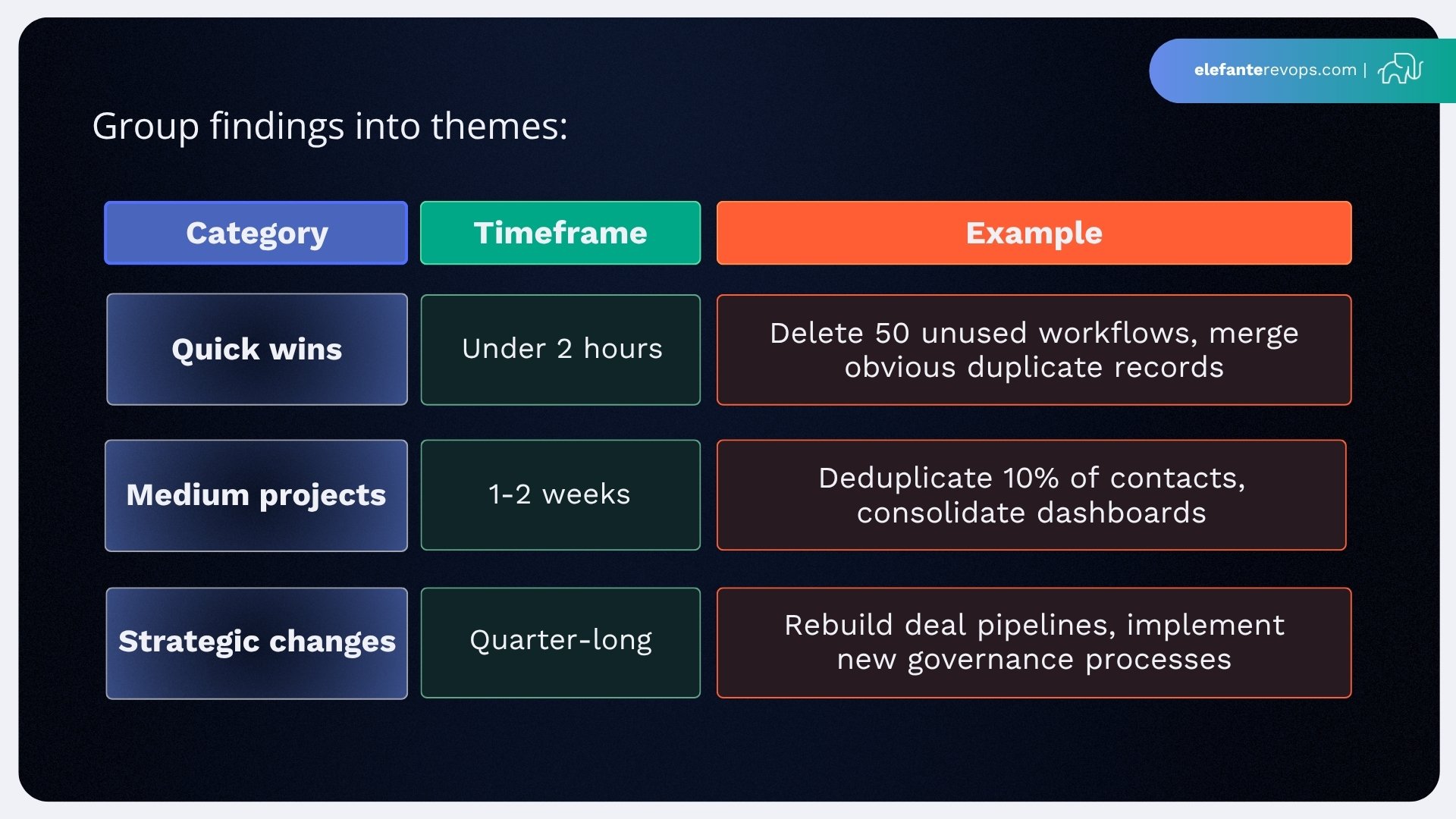
Group findings into themes:
Assign ownership:
- Marketing Ops: Lists, forms, email performance, lifecycle stages
- Sales Ops: Pipelines, deal stages, sales team adoption
- RevOps: Cross-functional automation, reporting, integrations
- IT: Security, user management, API integrations
Create actionable recommendations with clear due dates. A detailed report without owners becomes shelf-ware.
Ongoing cadence:
- Quarterly “mini audits” reviewing key metrics and identifying areas of drift
- Annual comprehensive audit using this full framework
- Benchmark progress using the same metrics each cycle
Regular HubSpot audits, even lightweight ones, prevent the accumulation of technical debt that triggers expensive remediation projects. This approach helps your business grow without CRM chaos holding you back.
Example 90-Day HubSpot Audit Roadmap
Days 1-30: Data & Quick Fixes
- Merge top 500 duplicate contacts identified during audit
- Assign owners to all contacts and companies (target: 95% coverage)
- Delete bounced contacts and obviously invalid records
- Standardize contact properties and remove unused custom properties
- Document unique data requirements for each team
Days 31-60: Automation & Reporting
- Reduce workflow count by 20% through archiving and consolidation
- Add descriptions to all remaining active workflows
- Consolidate dashboards to 5-10 official versions
- Create or update cross-object reports for sales and marketing alignment
- Review lead scoring rules and update for current content offers
- Streamline processes that span multiple HubSpot hubs
Days 61-90: Integrations & Governance
- Replace legacy integration with native HubSpot connection
- Complete user access audit and remove ex-employee accounts
- Implement role-based permission profiles
- Document workflow ownership and approval processes
- Schedule quarterly review meetings for ongoing maintenance
- Confirm better efficiency through metric tracking
Success metrics to track:
- Contact ownership rate: baseline → 95%+
- Duplicate rate: baseline → <5%
- Report generation time: hours → minutes
- Workflow count: baseline → 20% reduction
- Dashboard consolidation: 50+ → 10 official dashboards
Timelines should be realistic for a team also running day-to-day campaigns. A HubSpot partner can help accelerate implementation if internal bandwidth is limited.
The goal isn’t perfection, it’s continuous improvement. Each audit cycle builds on the last, and HubSpot experts recommend treating your portal as a living system requiring ongoing attention rather than a one-time setup.
Start with data quality this week. Pull the metrics, document your baseline, and assign your first quick wins. Your future self, and your entire organization, will thank you for taking action now.