



.svg)



.svg)


.svg)


Last updated: 17 August 2026. All prices in this article were checked against Zoho's and HubSpot's own pricing pages on that date.
You have narrowed it to two platforms, and both look fine on paper. That is the actual problem with Zoho vs HubSpot: the feature grids come out roughly even, the demos both go well, and the decision quietly becomes a budget argument nobody wins.
Upfront: elefante is a HubSpot partner. We make money implementing HubSpot, so keep that in mind as you read. Zoho wins several sections here outright, and if you fit the profile that should buy Zoho, we'll tell you so instead of pitching you.
Here is the claim this article is built on. Most comparisons test the software. Almost none of them test what happens after you pick, and that is where the cost actually lands: who configures it, who maintains it, what the bill looks like in year three, and whether your team is still using it in month eighteen. On those questions, the two platforms are not close, and the answer is not the one either vendor's website gives you.
Zoho vs HubSpot at a Glance
The verdict, with conditions. If marketing and sales need to work off the same customer record and nobody on your team wants to own CRM configuration as part of their job, buy HubSpot and accept that you are paying roughly four times more per seat for that. If you have a named person who will own the system, or your process does not fit standard pipeline defaults, or you already run other Zoho apps, buy Zoho and put the licence savings into somebody's time. The failure mode is picking Zoho for the price and then not staffing it. That is the most expensive outcome available in this comparison, and it is the one we get called in to clean up most often.
The Short Answer
Pick HubSpot if:
- Marketing and sales argue about lead data, and you want that argument ended structurally, not with a sync
- Nobody on your team will own CRM configuration as part of their actual job
- You need people productive in weeks, not quarters
- Your sales process is conventional: inbound leads, a pipeline, sequences, forecasting
- You have 20 or more revenue seats and budget shaped as predictable operating expense
- You expect to add service or content on the same record within 18 months
- You want free view-only seats for finance, leadership, and support
Pick Zoho if:
- You have a named internal owner for the CRM, or will hire or contract one
- Your process is unusual enough that opinionated defaults would fight you
- You already run Zoho Books, Desk or Campaigns, so the data is in the ecosystem
- You need custom modules that do not map to contacts, companies, and deals
- Per-seat cost is the number your finance team actually reviews
- You have many light users who need limited access at $9 rather than $90
- You are under 10 seats and want a real CRM, not a trial that expires into a sales call
If you match the Zoho list, buy Zoho. You don't need elefante for this one.
Pricing: What Zoho CRM vs HubSpot Actually Costs
Verified 17 August 2026, in USD, per user per month.
Zoho CRM. Free for up to 3 users. Standard is $14 billed annually or $20 monthly, Professional $23 or $35, Enterprise $40 or $50, Ultimate $52 or $65. No seat minimums. The line item nobody covers: a Team User seat at $9 annually or $11 monthly, which can view records across up to ten org modules and work fully inside assigned team modules, but cannot own org records or run reports. For a company with a large low-touch population, that changes the maths considerably. Advanced analytics and Zia AI sit at Enterprise, so if reporting is central you are comparing at $40, not $23. Zoho Analytics is separate, from about $25 a month, as is Zoho Creator.
HubSpot. Free CRM at $0. Sales Hub Starter is $7 per seat annually or $20 monthly. Professional is $90 per seat annually or $100 monthly plus a mandatory one-time $1,500 onboarding fee. Enterprise is $150 per seat with a mandatory $3,500 fee. View-only seats are free, HubSpot's best answer to Zoho's $9 Team User. The number that ambushes people is marketing contacts. Marketing Hub Professional is $800 a month, including three core seats and 2,000 contacts, with a $3,000 onboarding fee, extra seats at $45, and $250 per additional 5,000 contacts. That is a step function, not a slope: crossing 2,001 contacts adds roughly $250 a month.
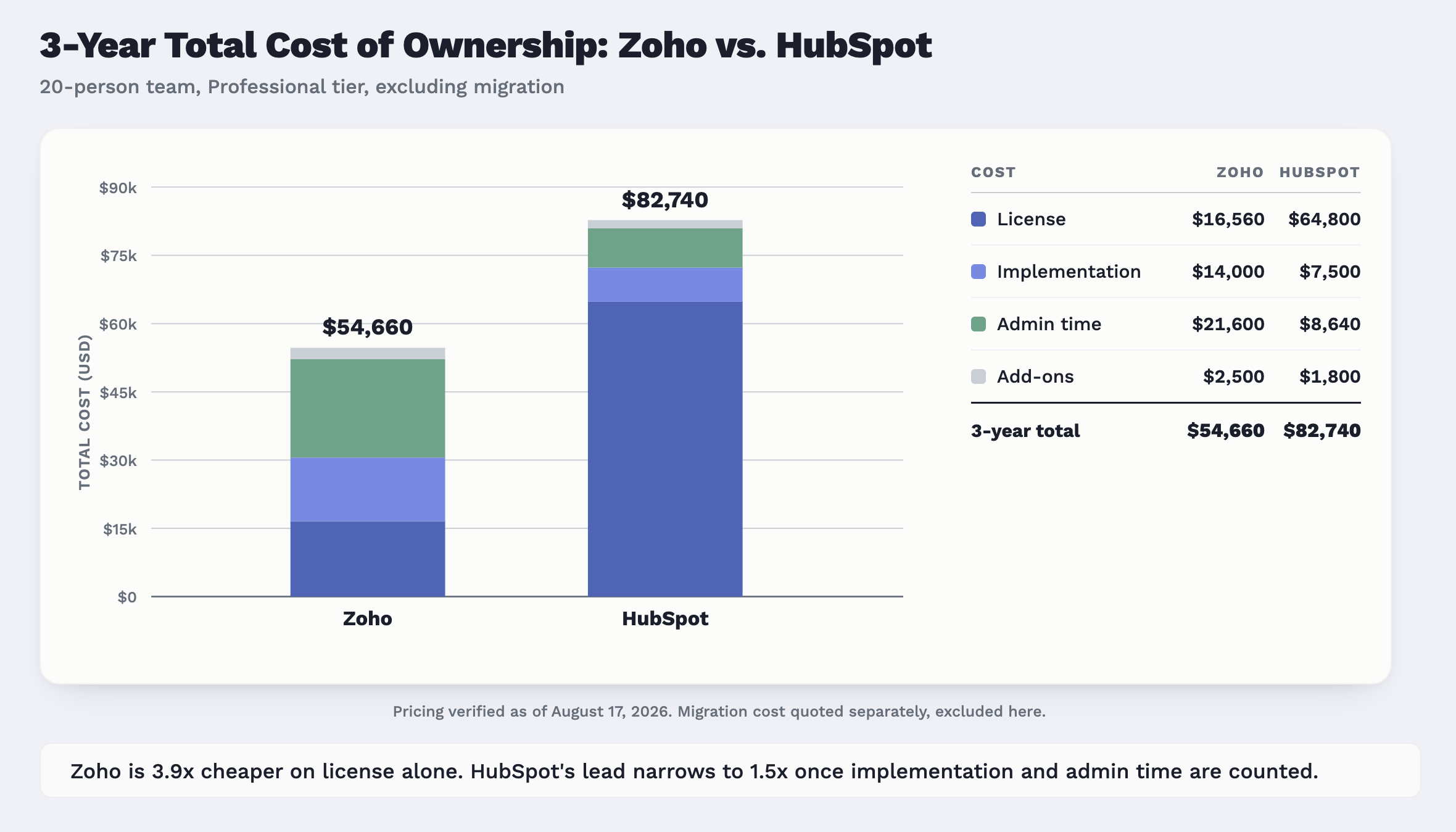
On licence, Zoho wins, and it is not close. At 20 seats on the mid tier, Zoho Professional is $460 per month against $1,800 for Sales Hub Professional. Over three years, roughly $16,600 against $64,800.
Then you count the work.
|
Cost component, 20 users over 3 years |
Zoho CRM Professional |
HubSpot Sales Hub Pro |
|
License |
$16,560 |
$64,800 |
|
Onboarding and implementation |
$8,000 to $20,000 partner or contractor work; $14,000 modelled |
$1,500 mandatory onboarding plus roughly $6,000 configuration; $7,500 modelled |
|
Migration from your current system |
Quoted separately. elefante services run 14 to 24 weeks, from $25,000 end to end |
Same range, same page, same dependency on source-system mess |
|
Internal admin time |
~10 hrs/month at $60/hr loaded = $21,600 |
~4 hrs/month at $60/hr loaded = $8,640 |
|
Commonly missed add-ons |
Team User seats at $9; Zoho Analytics from $25/mo; $2,500 modelled |
Extra credits and integration costs; $1,800 modelled |
|
Three-year total, excluding migration |
~$54,700 |
~$82,700 |
Zoho is 3.9 times cheaper on licence alone. It is 1.5 times cheaper once you count the work. Both of those sentences are true, and which one matters depends entirely on whether the admin hours in row four exist inside your company or not. If they do not, you will not save the money; you will convert it into an unmaintained system.
Setup and Ease of Use
This one goes to HubSpot clearly, and pretending otherwise would waste your time. A HubSpot instance is useful on day one. Pipelines, deal stages, email tracking, sequences, and dashboards exist before you touch anything; the onboarding path is guided, and the learning resources are the best in the category by a wide margin. New reps need a walkthrough rather than training. Zoho asks more of you first: modules to decide on, layouts to build, automation to wire, and a settings area that assumes you know what you want.
Now the counterweight, because it matters more than the compliment. HubSpot is fast because it has already made the decisions for you. That is a real advantage when your process is conventional and stops being one the moment it is not. Teams selling through channel partners, running consumption-based renewals, or managing anything that is not naturally a contact-company-deal shape end up bending HubSpot's object model, and that bending is slower and uglier than building the right shape in Zoho would have been. The speed is not free. It is prepaid, in flexibility.
Customization: Where Zoho Wins
Zoho's customization is deeper than HubSpot's and, more importantly, available earlier. Custom modules, field-level permissions, multiple page layouts per module, and Canvas, the drag-and-drop record-view designer, all arrive at Professional, at $23 a seat. Blueprint, Zoho's process engine, also starts there. HubSpot's comparable control lives at Professional and Enterprise, at $90 and $150. If you need a CRM to model something that is not a standard sales pipeline, Zoho lets you do it for a fifth of the money.
One correction to the marketing on both sides: Zoho Creator, the low-code builder people cite as a Zoho advantage, is a separate product with its own per-user pricing, bundled into Zoho One rather than any CRM tier. Do not budget for CRM and expect Creator.
The tradeoff is not technical; it is organisational. More control means more decisions, and every decision needs an owner. So ask the deciding question out loud: is there someone here whose job will include owning CRM configuration? If yes, Zoho's flexibility is a genuine asset, and you get more system for less money. If no, it becomes forty half-configured fields, three abandoned custom modules, and a system your reps do not trust. We have seen that instance. It is not cheap.
Automation and Workflows
Both platforms will do what you need. The difference is shape, not power.
Building a lead routing rule in HubSpot takes about ten minutes: a workflow, a trigger, branching logic on a property, an owner assignment, done, in an interface that reads like a flowchart. Zoho's equivalent spans assignment rules, workflow rules, and, for anything sequential, Blueprint. Blueprint is the more capable tool by some distance. You draw the sales process as states and transitions, then mandate what has to be true before a deal can move: fields completed, approval given, document attached. HubSpot has no direct equivalent that enforces process at the record level.
The cost is a learning curve. A HubSpot admin is productive in a week. A Zoho admin needs a month before Blueprint stops feeling like homework, and it is capped at three blueprints per org on Professional, 50 on Enterprise. For a multi-step follow-up sequence, HubSpot is faster to build and easier to hand to a marketer. For a process you need enforced rather than suggested, Zoho is the better instrument.
Reporting and analytics
This is where HubSpot's pricing bites hardest. Custom reporting is a Professional feature, which means it costs $90 per seat to answer questions the CRM already has the data for. Starter, at $7, gives you very little. Professional allows up to 100 custom reports; Enterprise up to 500.
Zoho ships dashboards and standard reports on every paid tier, so a $23 seat answers real questions on day one. Be precise about the ceiling, though: Zia AI and Zoho's advanced analytics sit at Enterprise, at $40, and Zoho Analytics proper is a separate subscription from about $25 per month. So Zoho wins the low and mid tiers on reporting value, and HubSpot narrows it higher up, where reporting is better integrated because it reads one data model rather than joining two. A feature checklist shows both as "custom reporting: yes." The tier it sits behind is the actual cost.
HubSpot CRM vs Zoho CRM: Marketing and the Rest of the Stack
This is the structural difference, and it decides more than any feature comparison. HubSpot is one platform with several hubs reading and writing the same contact and company record. Marketing sends an email, the rep sees it on the record, with no sync, no field mapping, and no reconciliation meeting. Zoho is a strong CRM inside a wide suite of separately adopted apps. Campaigns handles email, Desk support, Books invoicing, joined by native connectors that work well and that somebody still has to configure and own.
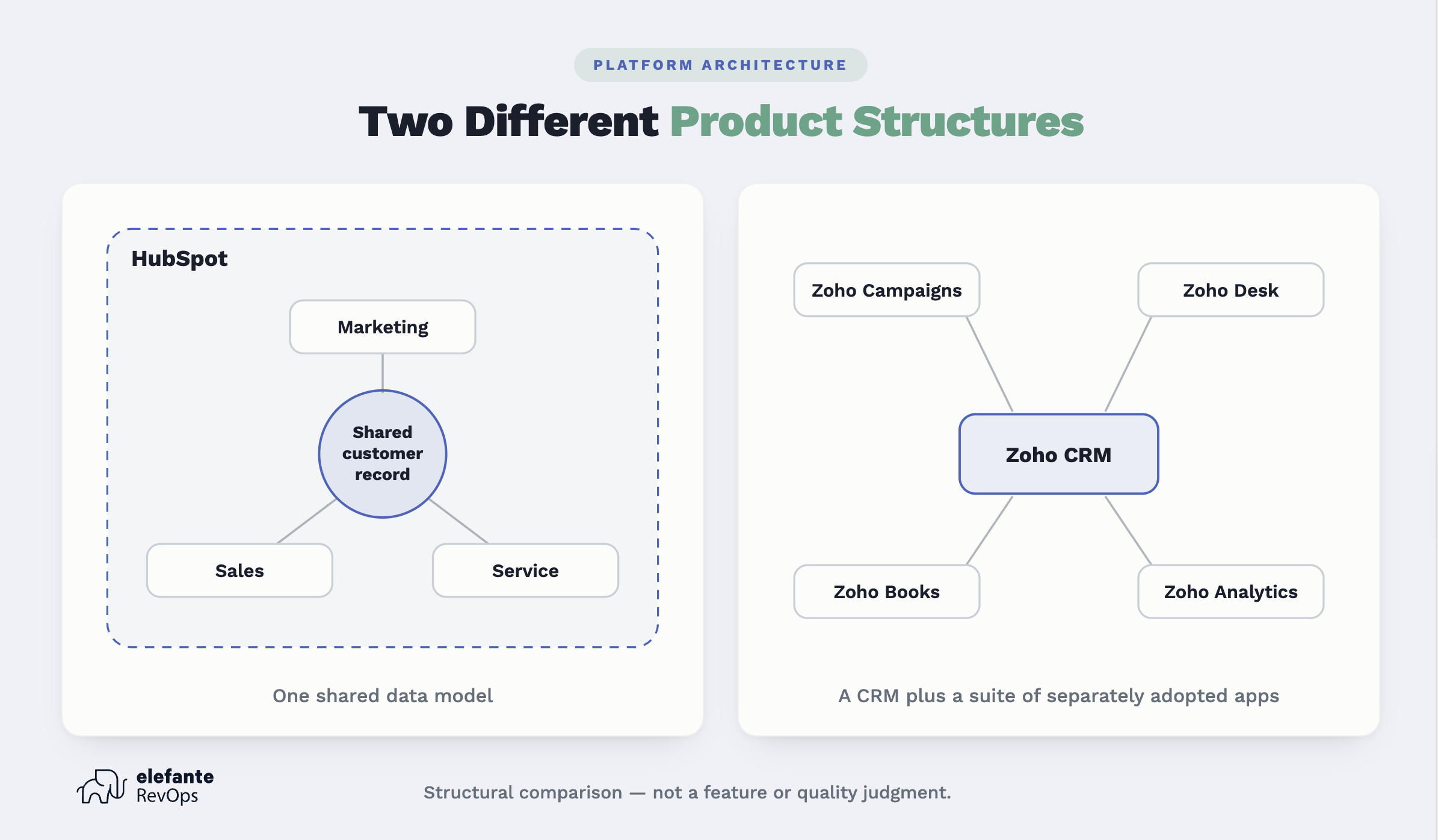
Neither shape is wrong. They fail differently. HubSpot's failure mode is paying for a shared data model you use one-third of. Zoho's is a connector that quietly stops syncing in month nine, and nobody notices until a report looks wrong.
So the real question is not which has more features. It is whether you are buying a CRM or the system your whole revenue team will work in. If sales alone needs the tool and marketing is happy in its own stack, Zoho is the better-value answer and the shared data model is a premium you do not need. If everyone touching revenue should be looking at the same record, HubSpot is built for that, and Zoho is being asked to approximate it.
AI Features
Zoho's Zia does lead scoring, anomaly detection, prediction, and assistant-style querying, gated to Enterprise and above. HubSpot's AI covers content generation, call summarisation, forecasting help, and an increasingly agentic layer across the platform, with credits attached to paid tiers. Functionally, they overlap heavily, and neither is clearly ahead in a way that survives a quarter. Both vendors ship meaningful AI changes every few months, and any verdict written here is stale by the next release. Treat AI as a tiebreaker at most. If a vendor's AI roadmap is doing significant work in your business case, the business case is thin.
Integrations and how each fits your existing stack
HubSpot's marketplace is larger where it counts: mainstream SaaS, billing, support, data warehousing, and the long tail of sales tooling. Native connectors are generally deeper, better documented, and less likely to need middleware. Zoho's marketplace is broad but uneven outside its own ecosystem, and API-level work is more often the answer for anything unusual.
Inside its own ecosystem, Zoho is unbeatable, and here is the honest pattern: if you already run Zoho Books for finance and Zoho Desk for support, the integration question is largely answered, and moving your CRM elsewhere means building and owning two connections you currently get for free. That should weigh more heavily than marketplace counts. The logic runs in reverse too. If billing is Stripe, data lives in Snowflake, and support is Zendesk, HubSpot's native depth saves you real work. Count the connections you actually need, not the ones in the marketplace.
The Part the Comparisons Skip: What it Takes to Run Each One
Who administers this? At 20 seats, Zoho realistically needs 8 to 12 hours a month of a competent owner's time: field hygiene, automation adjustments, permission changes, connector checks. HubSpot needs 3 to 5, until you hit a customization edge, where it needs an expert rather than an owner. Neither number is zero, and neither appears on any pricing page.
What breaks first. Zoho breaks at the seams: a connector between CRM and Campaigns stops passing a field, two modules disagree about the same customer, an automation built by someone who left fires on a condition nobody remembers. HubSpot breaks at the model: a team forces a process the object model was not designed for, ends up with parallel pipelines and duplicated properties, and learns that a shared data model is only an advantage while everybody agrees what a contact is.
Adoption. A CRM nobody uses costs more than an expensive one people actually use, and this is the strongest argument for HubSpot that has nothing to do with features. Reps enter data in HubSpot because entering it is easy. In a well-configured Zoho, they will too. In a half-configured Zoho, they will not, and you will be running the business off exported spreadsheets within two quarters while still paying for the CRM.
The eighteen-month problem. At month eighteen, both instances have real data volume, fields nobody remembers creating, and automation somebody built and left. In our engagements, the Zoho instances are usually more capable and less trusted: they do more, and fewer people believe the reports. The HubSpot instances are more trusted and more expensive than anyone forecast, because seat counts crept and marketing contacts crossed a tier boundary. Zoho's problem needs a named owner and a cleanup project. HubSpot needs a licence conversation and property governance. Knowing which you would rather have in eighteen months is a better decision input than any feature grid, and it is where our RevOps as a service engagements start on both platforms.
Switching Later: What it Costs to Change Your Mind
Both directions are possible, and neither is free. Contacts, companies, deals, and most standard fields move cleanly. Notes, tasks, and email history move with more effort and some loss of fidelity. What does not move is everything that encoded your process: automation, Blueprint states, custom report definitions, dashboards, permission schemes, and integrations. Those get rebuilt, not migrated, and that rebuild is most of the cost in both directions.
Zoho to HubSpot is the more common move and slightly the easier one, because HubSpot's target model is narrower, so mapping means collapsing custom modules into standard objects and properties. HubSpot to Zoho is harder in a specific way: you are exploding one shared record into several apps and deciding where each piece of history now lives.
Budget 14 to 24 weeks from assessment to go-live for a mid-market migration, the range our CRM migration services work to. History gets lost in activity timelines and attachments, usually because someone ran the contact import first, found the timeline had not come with it, and by then records had been edited. Map the data before anything moves, and validate on production-scale volume rather than a sample.
Alternatives Worth a Look
Pipedrive (Lite $14, Growth $39 per seat) is the answer if you want a pipeline and nothing else, with almost no admin burden.
Salesforce (Starter Suite $25, Pro Suite $100, Enterprise $175) makes sense once you have dedicated ops headcount and a process too complex for either platform here; below that, it is overhead you pay for and do not use.
Freshsales (Growth $9, Pro $39) suits price-sensitive teams wanting built-in phone and email.
monday CRM (Basic $12, Standard $17, three-seat minimum) fits teams already running work in monday boards who want CRM as another view.
Our Verdict
Buy HubSpot if marketing, sales, and service need to share one customer record and no one internally will own configuration as part of their job. Buy Zoho if you have that owner, or your process does not fit standard defaults, or you are already in the Zoho ecosystem. In one line each: HubSpot is for teams buying a system to work in, Zoho is for teams buying a CRM to shape. The pricing gap is real but smaller than it looks, roughly four times on licence and about 1.5 times once implementation and admin time are counted, and it inverts entirely if you buy Zoho and do not staff it.
The platform matters less than whether it gets configured around how your team actually sells. We have seen both work, and both fail, and the difference was almost never the software. It was whether anyone owned the thing after go-live. If you want that assessed before you sign either contract, start with a conversation about our HubSpot implementation services.
FAQ
Is HubSpot better than Zoho?
Neither is universally better. HubSpot is better if marketing and sales need to share one data model and nobody internally will own CRM configuration. Zoho is better if you have that owner, need deeper customization at a lower tier, or already run other Zoho apps. Budget, ownership, and whether marketing lives in the same system decide it, not feature counts.
Is Zoho cheaper than HubSpot?
On licence, yes, substantially: $23 per user per month for Professional against $90 per seat for HubSpot Sales Hub Professional. On total cost over three years at 20 users, the gap narrows from about 3.9 times to about 1.5 times, because Zoho needs roughly twice the internal admin time and more configuration work up front. Cheaper on licence, less cheap in reality.
Which is easier to use?
HubSpot, clearly, out of the box. It ships with working pipelines, dashboards and sequences, and reps generally need a walkthrough rather than training. The caveat is that the speed comes from opinionated defaults. If your sales process does not resemble those defaults, the advantage disappears, and you end up bending the object model instead.
Which has better automation?
Neither is more powerful; they differ in shape. HubSpot is faster to build in and easier to hand to a non-technical user. Zoho goes deeper once learned, particularly Blueprint, which enforces process at the record level in a way HubSpot has no direct equivalent for. Choose HubSpot for speed, Zoho for enforced discipline.
Can Zoho do marketing automation like HubSpot?
Yes, but structurally differently. Zoho Campaigns and the CRM Plus bundle deliver comparable capability as connected apps joined by native connectors. HubSpot's Marketing Hub reads and writes the same record as the CRM. The functionality is similar; the difference is whether you own a sync. That is the whole marketing-versus-platform question in one sentence.
Which is better for a small team?
For a team under 10, Zoho is usually the better buy, provided one person will own configuration. Zoho's free tier covers 3 users with real functionality, and Standard at $14 is a genuine CRM. Without that owner, HubSpot's free CRM and $7 Starter seats get you working faster with less that can go quietly wrong.
Which is better for a company with 50 or more employees?
It depends on whether marketing, sales, and service need one shared record at that scale. If yes, HubSpot's structure earns its price and reconciliation costs across separate apps stop being trivial. If sales is the only team in the CRM, Zoho Enterprise at $40 per user against HubSpot Professional at $90 is a large, defensible saving.
How long does it take to migrate from Zoho to HubSpot?
Plan 14 to 24 weeks from assessment to go-live, which is the range elefante's CRM migration engagements work to. Simple migrations with clean data and few integrations finish faster. Extensive billing and data-stack integrations, heavy custom modules, or years of unmanaged history push toward the upper end. The data rarely sets the timeline; the integrations and the process rebuild do.
Can you use both together?
Technically yes, via integration or middleware. Practically, it is rare, and when we see it, it is usually a sign the decision was never actually made: marketing bought HubSpot, sales kept Zoho, and now two systems disagree about the same customer. Running both means owning a sync forever. Pick one and move the other's data.
Which has better reporting?
Depends on your tier. Zoho gives usable dashboards and reports on every paid plan from $14, while HubSpot gates custom reporting behind Professional at $90 per seat. Higher up, it reverses: HubSpot's reporting is better integrated because it reads one data model, while Zoho's advanced analytics needs Enterprise or a separate Zoho Analytics subscription